

BRAND-NEW LIVE WORKSHOP • FIRST TIME OFFERED • BRAND-NEW LIVE WORKSHOP • FIRST TIME OFFERED • BRAND-NEW LIVE WORKSHOP • FIRST TIME OFFERED
Someone asks where you sourced that perfect image. You get to tell them you created it custom for the project.
That’s the potential of AI.
But getting there isn’t always quite so simple.
You already have the designer's eye to know when an image isn't quite working.
But without knowing what makes a photograph feel real, it’s hard to pinpoint exactly what’s giving AI away.
So you end up:
Endlessly regenerating images that are almost right
Wasting time refining outputs that were never going to work
Settling for an image that’s “good enough for AI” but not really good enough for your client
AI gets you 80% of the way there (figuratively speaking:). It’s that last 20% that’s hard. And getting through to the finish line takes more than telling AI to “make it more realistic.”
That’s where this workshop comes in.
You'll learn how to make the people, environments, and objects in your lifestyle AI images look far more photorealistic by diagnosing what feels fake and knowing how to refine it.

You’ll start noticing the little things that give AI away, from stiff poses and too-smooth textures to off-looking angles, and more importantly, you’ll know what to do about them.

You’ll create the incredibly specific image your client needs that you’d never find on a stock site - the right person, the right setting, the right details. And it actually looks like a photograph.

You’ll stop wasting time regenerating and start recognizing which outputs have potential, what needs fixing, and how to get them across the
finish line.
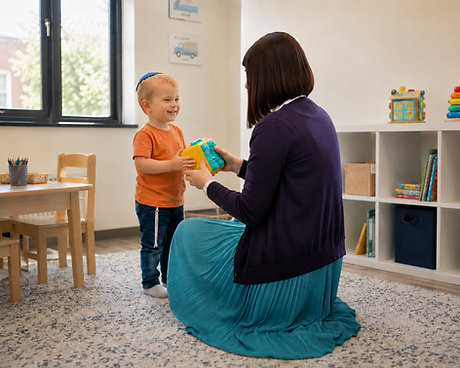
So you can get photorealistic, usable images without so much regenerating, tweaking, and hoping for the best. Images like these -


Here’s what we’ll cover in “Breaking the AI Look”
The 3 places an image’s believability usually breaks (scene, capture, and details) and how to tell which one is causing the problem
How to use the way a camera works to direct the way you prompt AI
The one mindset shift needed to make your fix-it prompts actually improve your images
Why adding grain, blur, pores, or “imperfections” isn’t automatically more realistic, and what to do instead
How to prevent AI from accidentally changing what’s already working
When to use AI for your edits and when to move to Photoshop
Watch Liat put it all together, diagnosing and fixing an AI image live
You’ll stop asking
“Why does this look AI?”
And instead learn to:
Diagnose → Edit → Verify
Scene
Could this exist?
Capture
Could a camera capture this?
Details
Do the details hold up?

PLUS you’ll get

60-Day access to the recording
So you can rewatch the demo and work through the material at your own pace

Practice Challenge
Put your new skills to the test with hands-on exercises and an answer key to check your work.

AI Realism Framework
A breakdown of the key elements that make images look realistic, with guiding questions to help you spot exactly what's wrong.
BONUS Gift from Liat!
An exclusive 18-page resource from Liat to help you take your AI image creation skills even further.
AI Realism Workflow Guide
A step-by-step guide and checklist to diagnosing, editing, and verifying AI images, including when to use AI vs. Photoshop.

Who’s teaching this?
Liat Kohanteb is the Founder and Creative Director of Kre8ive Touch branding and design studio. With more than 12 years of experience in branding, web design, marketing, and strategy, she's spent her career helping designers and creative teams clarify ideas and make stronger strategic decisions.
These days, one of her focuses is helping designers bring AI image generation into real client work, with the same control and judgment they'd bring to any other tool. To that end, she created Design Unstocked™, an AI image generation course built for designers that 25+ creatives have been trained in.
These are just some of the amazing AI images she’s created for her client designs:


What her students are saying
about her teaching, AI methodolgy, and Design Unstocked™ course
“Liat’s course was clear, hands-on, and detailed. It was helpful to watch each step in action, and Liat covered a lot without making it feel overwhelming. I recently created images for a website using this method, and the results were 100x more on point — realistic, super branded, and much more aligned with what I needed.”
F. Goldstein, Graphic & Web Designer

“As a designer, Liat’s course really helped me. I used what I learned to create an ad from a client’s original image, working through prompts and then refining the result with another tool. The lessons were A++ helpful and gave me a better sense of how to keep improving the image until it worked.”
Designer, Monsey, NY
“I took an AI image course already a couple years ago, and I thought I knew most of what there is to know. Behold! I am humbled 😅 Watching you prompt in real time taught me a lot. Lifestyle imagery I find the hardest style because all the details have to be perfect if you don't want it to be a dead giveaway that AI was involved. But the tips, hacks, and prompts worked amazingly well and I generated some super realistic lifestyle mockups for my clients. I learned so many new skills for editing and getting the details down pat. It was amazing!”
Miri Miller, Brand Strategist Catch Branding

“Liat’s classes were clear and thorough, and I really enjoyed seeing the live examples and how Liat applies AI image generation in real design work. Even though AI keeps changing, I’m happy I took the course because it gave me confidence in the image creation process and brought up practical details I wouldn’t have thought of on my own.”
Esti Waldman, Web Designer
“Liat’s AI image generation course was clear, practical, and easy to follow. She made unfamiliar concepts feel approachable, and students were able to begin applying what they learned right away. Her slides and handouts were especially impressive — comprehensive, thoughtfully organized, and useful long after the course ended.”
Malkie Scholnick, Chief, The Bold Edge

“Liat walks you through the process step by step, in real time, so you walk away knowing what to do. And the course is designed to stay helpful as AI keeps evolving, which is a major plus.
I highly recommend it to any designer who wants to up their AI image-generation game!”
Yael Dolinger, Graphic & Web Designer, Yael Design

“Liat’s AI image generation course completely changed the way I approach AI. I used to blow through credits like it was nobody’s business, without really understanding just how much the quality of my prompts affected the results.
Since taking Design Unstocked my outcomes are so much better. I especially appreciated that Liat demonstrated everything she taught. It made the concepts feel incredibly hands-on and easy to apply.
I only wish I had taken this course sooner!”
Esti Meisels, Creative Director, Code & Spade

“Liat's framework is super detailed and nuanced, but she explains everything so clearly and practically.
I especially love that she spends so much time on the thinking behind it before even getting into prompting. It completely changed the way I look at AI - instead of just hoping it gives me something usable, I feel like I can actually art-direct it and get much more targeted results.
I came away feeling like I have a much better handle on the whole process, and I’d absolutely recommend this course to any designer who wants to level up their image generation skills.”
Miriam Kirzner, Founder & Creative Director Studio BLU

"Liat has a future-focused mindset, teaching concepts and methods that stay useful even as AI evolves so quickly. I love that I now have a real process and don’t have to figure out the nuances on my own. I’m getting truly high-quality results that elevate my design work to a new level. Liat really knows what she’s doing."
Sara Margolies, Founder + Creative Director, The Grid Group

FAQ
Will I be able to ask questions during the workshop? What if I have a question but I can’t attend live?
Yes! There will be a live 15 minutes of Q&A at the end of the workshop for any questions you have. If you can’t make it, you can submit your questions in advance by emailing liat@kre8ivetouch.com. Liat will answer all submitted questions live which you’ll be able to watch in the recording. However, we’d love to see your face!
I’m pretty new to AI, will this be over my head?
The AI tools we’ll be focusing on understand basic English the same way we email, text, and Slack each other. So you don’t need any specialized information or experience to start prompting or editing. If you know the basics on how to generate an image, then you’re ready for this!
Do I need to buy an AI subscription to gain from the workshop?
You can definitely follow along, learn all the principles, and do all the practice work on the free versions. But they each come with their own set of limitations on how many images you can generate per day and the quality of the output. You can still learn and practice on the free versions, but if you plan on using these images professionally we recommend paying for an AI tool to get the best quality results.
Will this actually work on the kinds of images I make?
Liat is going to be focusing on photorealism in people, scenes, and objects. All of her examples will be using real photos, rather than illustrations, the kinds you might use in websites or ads. The principles learned, however, will be applicable to many image situations. Whether your image is a photo or an illustration, the angles, people’s postures, proportions, etc. still need to be accurate to make the illustration look “real” and not like an AI-fake. So you’ll still walk away with an understanding of images that will benefit you in almost any image generation situation.
Why should I learn this when AI is getting better so quickly anyway? Can't I just ask ChatGPT what's wrong with the image?
Liat is not just teaching which prompts work best with today’s AI. She’s teaching you how to evaluate a photo, what works, what doesn’t, and how to fix it. As AI continues to evolve, your ability to art direct the output and discern which option is best (and how to get it there) will continue to be valuable. The goal of this workshop is to train your eye so you’re not relying on AI to tell you whether its work is good.
Can men join?
The live workshop is available only for women. If you are a man who's interested in joining, be in touch directly here or by emailing frocksinstock@gmail.com.
Which AI tools/models will you cover in this workshop?
This workshop is focused on AI models that understand conversational language, including but not limited to: ChatGPT, Gemini, Google Flow, Adobe Firefly, and Magnific Image Editor. Liat will be doing her demo in ChatGPT specifically but the principles will apply to all of those models listed above.
Will I learn how to generate images?
Liat’s Design Unstocked™ course will cover image generation from the ground up. This workshop is specifically about improving—through prompting—the images you’ve already generated. That being said, by learning what to look for to improve an image, you’ll be able to work backwards and incorporate those instructions into your original image prompts in the first place to generate better results that need less fixing.
I’m already pretty good at generating AI images. Will I learn anything new?
This isn't an introduction to prompting or image generation. This workshop is specifically about developing a more sophisticated eye for photorealism, spotting subtle details that break believability, and learning how to refine already-good generations. If you're comfortable generating AI images but still find yourself getting results that are almost there, or want a better system for getting your images to the finish line, you're exactly who we designed this for.
Can’t I just keep prompting on my own until I get what I want?
Sure - if you have lots of time and patience. But if you’re not sure what needs fixing to make it look less fake, or AI doesn’t listen when you tell it to fix your image (or it “fixes” the wrong thing), or you don’t want to spend more time fixing your AI images then it would take to just create them from scratch in Photoshop, then this workshop is for you.
If I already took Liat’s course, will I learn anything new?
Yes. This workshop is brand new content - not based off of the course material. This was newly created to address this common challenge that designers generating AI-images encounter.